Introduction: Find Your Soundscape
In our increasingly noisy world, finding moments of focus, relaxation, or undisturbed sleep can be a challenge. That’s where ChromaTone comes in – a simple, yet powerful Android application I built to generate a spectrum of ambient noises designed to help you create your ideal auditory environment. More than just another white noise app, ChromaTone is crafted with a strong emphasis on privacy and user experience, ensuring that your peace of mind remains truly your own.
I believe that technology should serve us without demanding our data. ChromaTone reflects this philosophy, offering a clear, functional utility without any hidden trackers or unnecessary permissions. It’s about providing a tool that simply works, allowing you to tune out distractions and tune into your personal needs.
The Science of Sound: How Ambient Noise Helps
Ambient noises, such as white, pink, or brown noise, are more than just background sounds. They work by masking other disruptive noises at various frequencies, creating a more uniform auditory environment. This can:
- Improve Focus: By reducing the impact of sudden sounds (like conversations or traffic), ambient noise can help you concentrate better on tasks.
- Aid Sleep: A consistent, gentle sound can help lull your brain into a relaxed state, making it easier to fall asleep and stay asleep.
- Reduce Stress: For many, these consistent soundscapes offer a calming effect, helping to alleviate anxiety and promote relaxation.
Features Designed for Your Wellbeing
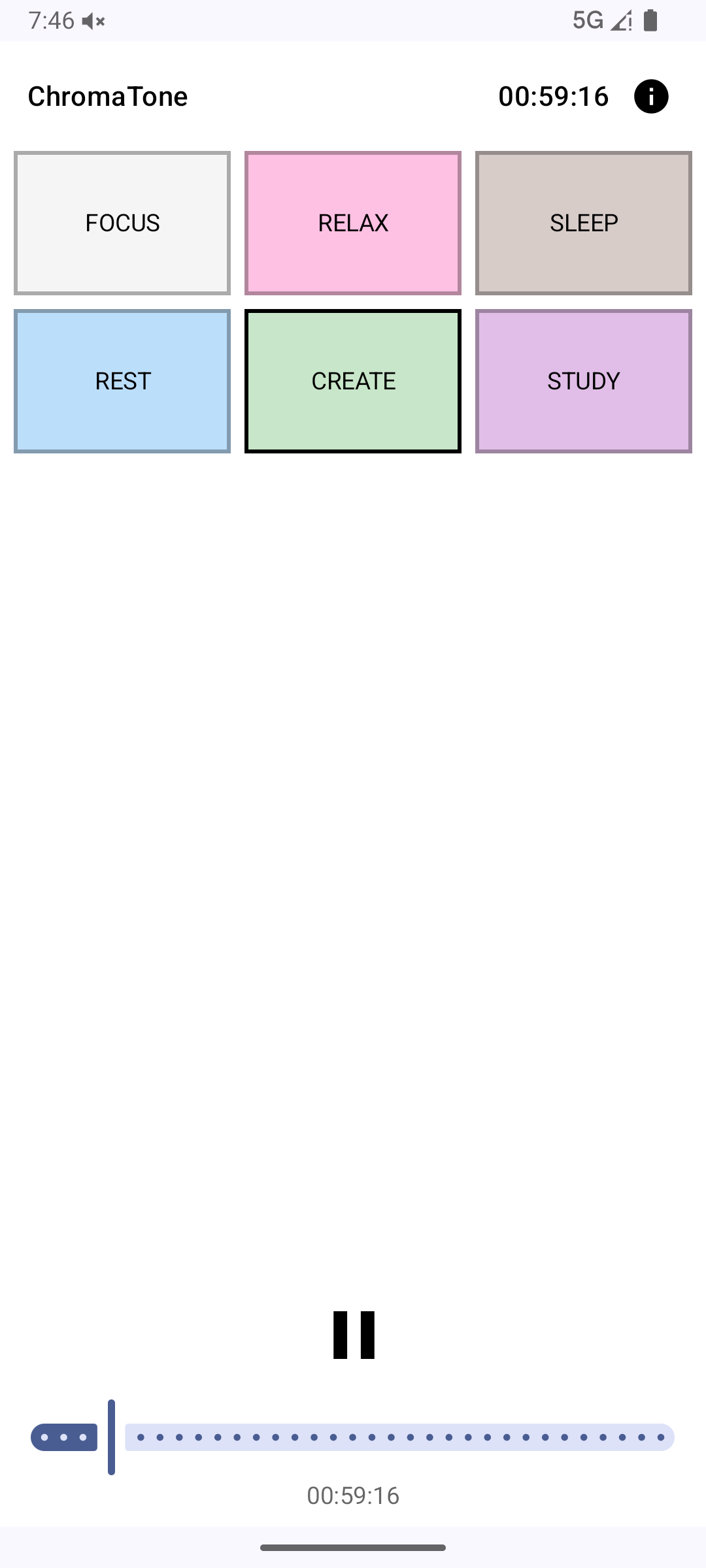
ChromaTone offers a curated selection of distinct noise types, each with its own unique sonic characteristics:
- White Noise: Contains all frequencies equally, masking a broad range of sounds.
- Pink Noise: Emphasizes lower frequencies, often described as a “flatter” or “softer” white noise, reminiscent of rainfall.
- Brown Noise: Even deeper, with more energy in lower frequencies, sounding like a strong waterfall or thunder.
- Green Noise: Centered around the middle frequencies of the audible spectrum, found in nature.
- Blue Noise: Focuses on higher frequencies, sounding like a hiss.
- Violet Noise: Even more intense high-frequency energy, often perceived as a shrill hiss.
The app’s interface is designed for intuitive “flip through” navigation, allowing you to easily switch between noise types and find the one that resonates with you. Each soundscape is paired with a subtle, corresponding color scheme to enhance the overall experience.
Behind the Scenes: A Focus on Efficiency and Privacy
Building ChromaTone, I focused on a few core technical principles:
- Performance: The audio engine is designed for efficiency and low-latency playback, ensuring a seamless and uninterrupted experience.
- Minimal Footprint: The app is lightweight, aiming for a small APK size and optimized battery usage.
- Privacy by Design: As an Android application, ChromaTone requires only the most essential permissions to function, with no internet access needed for its core features and absolutely no data collection. It adheres to the highest standards of user privacy.
My Journey with ChromaTone
The idea for ChromaTone emerged from my own need for a simple, reliable ambient noise app that didn’t bombard me with ads or collect my data. I wanted a tool that respected my privacy as much as it helped my focus. Developing it was an exercise in minimalist design and efficient Android engineering, pushing me to create a robust audio engine that could deliver consistent, high-quality sound without unnecessary bloat. It was a refreshing return to building a pure utility application, where the sole purpose is to enhance the user’s daily life.
Future Echoes
While ChromaTone is functional and stable in its current form, I envision future enhancements such as more advanced mixing capabilities, custom soundscape creation, and potentially an iOS version. The core mission, however, will always remain the same: to provide a simple, private, and effective tool for personal auditory well-being.
Setup Guide: Build and Install ChromaTone
Want to build ChromaTone yourself or contribute to the project? Here’s how to get started with the Android development environment.
Prerequisites
- Android Studio (latest stable version)
- JDK 11 or higher
- An Android device or emulator running Android 5.0 (API 21) or higher
Step 1: Install Android Studio
- Download Android Studio for your operating system
- Install Android Studio following the setup wizard
- During installation, ensure you install:
- Android SDK
- Android SDK Platform
- Android Virtual Device (for emulator)
Step 2: Clone the Repository
git clone https://github.com/surendranb/chromatone.git
cd chromatone
Step 3: Open in Android Studio
- Launch Android Studio
- Click “Open an Existing Project”
- Navigate to the cloned
chromatonedirectory - Click “OK”
- Wait for Gradle to sync (this may take a few minutes on first run)
Step 4: Build the Project
Option A: Build and Run on Emulator
- In Android Studio, click “Device Manager” (phone icon in the toolbar)
- Create a new virtual device if you don’t have one:
- Click “Create Device”
- Select a phone model (e.g., Pixel 6)
- Choose a system image (API 30 or higher recommended)
- Click “Finish”
- Click the green “Run” button (▶️) in the toolbar
- Select your emulator from the device list
- ChromaTone will build and launch on the emulator
Option B: Build and Run on Physical Device
- Enable Developer Options on your Android device:
- Go to Settings → About Phone
- Tap “Build Number” 7 times
- Enable USB Debugging:
- Go to Settings → Developer Options
- Enable “USB Debugging”
- Connect your device via USB
- Click the green “Run” button (▶️) in Android Studio
- Select your device from the list
- ChromaTone will install and launch on your device
Step 5: Build APK for Distribution
To create an installable APK file:
# From the project root directory
./gradlew assembleRelease
The APK will be generated at:
app/build/outputs/apk/release/app-release-unsigned.apkOptional: Sign Your APK
For distribution outside the Play Store, you’ll want to sign your APK:
-
Generate a keystore:
keytool -genkey -v -keystore my-release-key.keystore -alias my-key-alias -keyalg RSA -keysize 2048 -validity 10000 -
Sign the APK:
jarsigner -verbose -sigalg SHA256withRSA -digestalg SHA-256 -keystore my-release-key.keystore app-release-unsigned.apk my-key-alias
Troubleshooting
Gradle sync failed?
- Ensure you have a stable internet connection
- Try “File → Invalidate Caches / Restart”
Build errors?
- Check that you’re using JDK 11 or higher
- Update Android SDK tools in SDK Manager
App crashes on launch?
- Check the Logcat in Android Studio for error messages
- Ensure your device/emulator meets minimum API requirements
Contributing
Found a bug or want to add a feature? Contributions are welcome! Check out the repository for contribution guidelines.
View Repository: ChromaTone on GitHub